Weighing Scale Data Transfer Software: One Solution for Tally, ERP, Excel, Word, Web & PLC
Transfer weighing scale data directly to Tally, ERP, Excel, Word, web applications and PLC systems with a customized solution from U.P. Scales.


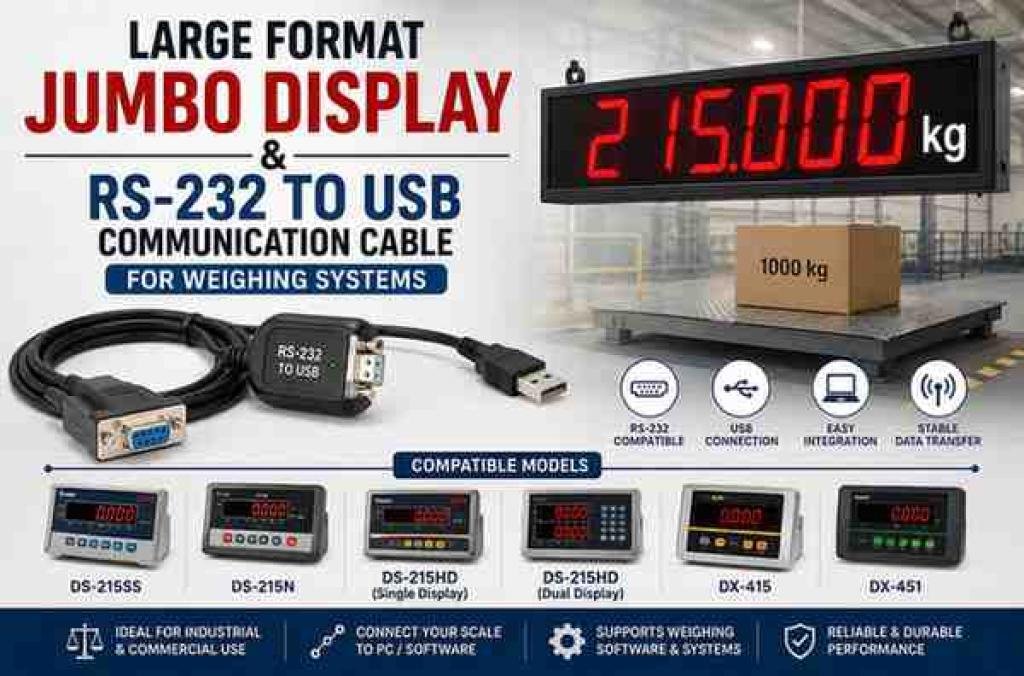
While the 50mm Jumbo Display (U11807) and the RS-232 to USB Cable (U20586) serve different primary functions, they are both enablers—they unlock the full potential of your weighing system.
In many industrial and logistics environments, the standard indicator display is simply not large enough to be read from a distance. Whether it's a crane operator looking down from a cabin, a forklift driver approaching a platform scale, or a supervisor monitoring a production line from across the floor, the ability to see weight readings clearly from far away is a critical safety and efficiency requirement.
The 50mm Jumbo Display is a large-format auxiliary display designed to solve this exact problem. With digits that stand a full 50 millimetres tall, this remote display projects weight readings with exceptional clarity, ensuring visibility from significant distances—even in challenging lighting conditions.
This jumbo display is designed for use with a wide range of Essae weighing indicators, including:
Note: As with all remote displays, the compatibility is model-specific. Always verify that your indicator has the required remote display output port before ordering.
The 50mm Jumbo Display is not just a convenience—it is a safety and efficiency tool. It reduces the need for workers to walk back and forth to read the indicator, speeds up the weighing process, and eliminates miscommunication caused by unclear readings. For any operation where weight is a critical metric, this display is a simple but powerful upgrade.
As technology evolves, older communication standards often become obsolete on new computers. Most modern laptops and PCs no longer come with the traditional 9-pin RS-232 serial ports that were once standard on industrial weighing indicators. However, many high-quality indicators—including several Essae models—still use RS-232 as their primary communication protocol for connecting to printers, remote displays, PLCs, and host computers.
The RS-232 to USB Cable Assembly is a purpose-built cable that bridges this gap. It converts the RS-232 serial signal from the indicator into a USB-compatible signal that can be read by a modern computer. This allows you to connect your weighing system to a PC, laptop, or tablet for data logging, configuration, or integration with software applications.
Seamless Legacy-to-Modern Connectivity: This cable effectively future-proofs your existing weighing hardware. Instead of replacing a perfectly functional indicator, you simply use this cable to connect it to a modern computer, extending the life of your investment.
Plug-and-Play Operation: The cable is designed to be user-friendly. In most cases, it requires no complex driver installation on modern Windows operating systems. Once connected, it appears as a virtual COM port, allowing your software to communicate with the indicator as if it were connected to a native serial port.
Data Logging & Analysis: With the USB connection, you can capture weight data directly into Excel, databases, or custom software applications. This enables real-time tracking, trend analysis, and comprehensive reporting—valuable for quality control, production monitoring, and inventory management.
Remote Configuration: Beyond data collection, the USB connection also allows technicians to upload configuration files (like the EQDF files we covered earlier) directly from a laptop. This simplifies field service and reduces the need to manually program indicators through their front keypad.
Built-in Signal Conversion: The cable is more than just a physical adapter. It contains the necessary electronics to convert the voltage levels and signal protocols between RS-232 and USB, ensuring reliable, error-free communication. It is not a simple pass-through cable; it is an active converter.
This RS-232 to USB cable assembly is designed for use with a comprehensive list of models, including:
Note: The cable is specifically configured to match the pinouts and signal parameters of these models. While it may work with other brands, it is optimized for the listed Essae indicators.
While the 50mm Jumbo Display (U11807) and the RS-232 to USB Cable (U20586) serve different primary functions, they are both enablers—they unlock the full potential of your weighing system.
Together, they transform a basic scale into a fully connected, transparent, and data-driven tool.
For example, in a logistics operation:
This synergy between physical visibility and digital connectivity is what modern weighing systems are all about.
Original Source: https://upscales.buyweighingmachine.com/blog/large-format-jumbo-display-rs-232-to-usb-communication-cable-for-weighing-systems

Transfer weighing scale data directly to Tally, ERP, Excel, Word, web applications and PLC systems with a customized solution from U.P. Scales.
Need reliable general-purpose laboratory balances? U.P. SCALES, authorized dealer of Aczet, offers CG-L precision balances, CG-N counting scales, CG-S stainless steel scales, and CG Series table top balances. Pan India delivery & installation.
In today's dynamic industrial landscape, weighing operations are no longer confined to fixed locations. Field service teams, mobile inspection units, logistics fleets, and temporary production sites all require weighing systems that can travel with them.